What is a CDN?

Content delivery network, CDN, is a globally distributed network of Points of Presence (PoP) designed to provide faster and reliable content delivery to users. Whether we know it or not, every one of us interacts with CDNs daily; when reading articles on news sites, shopping online, watching Netflix, or scrolling through social media feeds. CDN is the helper behind your seamless experience. It helps minimize loading time, costs, delivery latency, and operational complexity by physically reducing the distance between content providers and users worldwide.

How does CDN work?

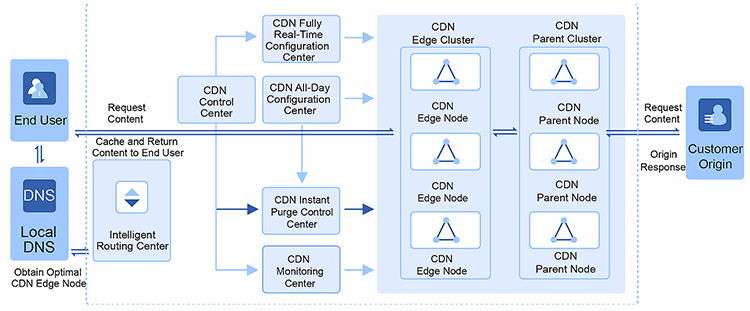
For example, when a user in the U.S. wants to load a website hosted in China, the user will need to send a request to the origin in China, and then the origin will send content from China to the U.S. However, it takes a longer time to load the content and might hamper the user experience. This is when CDN comes in. CDN keeps a copy of content at its own PoPs around the world. Based on users’ location, CDN serves the content to users from nearby PoPs whenever possible.

What are the benefits of using CDN?

  1. Faster load time: Instead of sending requests to the origin and waiting for it to respond, the user will receive content from the CDN PoP nearby to reduce the latency.
  2. Higher scalability: CDN can serve 40-200 Tbps at the peak of the traffic. It can provide an always-on experience globally, even under unpredictable situations such as malicious attacks or origin failure.
  3. Lower bandwidth costs: Through caching and request optimizations, CDN helps content providers significantly reduce delivery costs since most traffic no longer egress from the origin.
  4. Better security: CDN acts as a proxy in front of the origin server, which adds an extra layer to security by hiding the origin’s real IP.

Why is CDN essential in this pandemic?

Because of COVID-19, most people are on digital platforms more frequently for working, attending online classes, watching live streaming, gaming, etc. Due to the enormous traffic, the entire digital pipeline is becoming more sensitive to latency and security.

CDN can help deliver content in a fast, secured, and seamless way ensuring a consistent and optimized user experience worldwide.

* Please check the original article on TechRadar.

BaishanCloud

BaishanCloud is a leading global data service provider specialized in cross-border content delivery and edge security in China and Asia. To get more articles on trendy topics related to cloud delivery, streaming best practices, edge security, cloud technology in China and Asia, please visit www.baishancloud.com and subscribe to the BaishanCloud newsletter.

Streamlining Live Remote Acquisition of the Premier League for the Icelandic Audience

MOG’s streamlined production workflows have been helping broadcasters worldwide ensure a smooth acquisition and distribution of UHD/QFHD/FHD/HD/SD feeds in multiple formats and resolutions, with its powerful cloud software applications.

Recently, MOG and its Partner Exton has been selected by Síminn, the Icelandic Broadcaster, to ensure the smooth recording of 4 simultaneous HD 3G-SDI channels of the Premier League to fans across Iceland, with an intuitive but powerful remote software.

The Customer

Síminn hf. is a leading Icelandic telecommunications company that offers communication services for both private and corporate clients, including mobile, home phones, Internet connections, and television. Síminn also runs its own TV channel and streaming services.

The Partner

Exton ehf. is a knowledge company. The company’s most important sales product is the knowledge of its staff, whether it is the equipment they work with or the customers’ needs. The team counts on years of experience in production and post-production workflows of theatres, events, concerts, broadcasting, and audio/video   distribution, and it has been a valuable and efficient MOG partner for the Icelandic market, for years.

The Challenge

Síminn sought to acquire an ingest system to cover its acquisition needs with a solution that was simultaneously powerful, flexible, and cost-effective. One of the requirements was to have the media recorded locally, or to their SAN (Storage Area Network), with additional web preview functionality, so they can guarantee a constant and smooth overview of the incoming signals.

Considering that the acquisition was for a Live Sports workflow, one of the most crucial requirements was to minimize the editing time, as well as the transferring time of the assets. It was also necessary to provide editing and highlights capability while still recording (edit-while-growing), in order to assure a faster distribution on-the-fly.

The Solution

MOG’s 4PRO mediaREC software, from the MAM4PRO branch, was chosen to guarantee a broadcast-quality acquisition of 4 HD channels in 3G-SDI. The software can be accessed through an intuitive remote html5 UI, thus guaranteeing constant monitoring of the incoming signals.

The operation eliminates the need for a dedicated video recorder hardware while ensuring high-quality video encoding, that can be ready for edit- while-growing – through simultaneous proxy generation – and be ready for distribution in no time.

Each source can have its own separate setup, thus guaranteeing the correctly synchronized multi-camera playback sequence with all the associated media.

4PRO mediaREC is a powerful, cost-effective video recorder that can support UHD/QFHD/FHD in up to 12 SDI/IP Live video in Avid, OP1a, QT, MP4, XDCAM, XDCAM EX, XAVC, FLV, HLS, MPEG-DASH, WebM, MPEG-TS, Matroska, NDI and IMF formats. It is available as a software-only, or in a compact 2RU rack, depending on the customer’s needs.

How Should I Clean My Wired Microphone?

Please note this content applies specifically to Shure products. If you would like cleaning information for other manufacturers, we recommend you visit their web site. Shure will be updating this information over the upcoming months. New information will be found on this web page and at www.shure.com/en-GB.

Shure has received many requests for recommendations on the best ways to clean and disinfect our products. Please note that Shure cannot provide advice regarding what disinfectant methods are effective against the Covid-19 virus; any such question should be directed to appropriate disease control experts.  The information on this site relates solely to general information for cleaning methods for microphones.  Please note that the observations below do not imply any guarantee against damage to the product, but are based on the best information we have at this time.

Microphone Cleaning: Things to Avoid

To start off, let’s focus on the “don’ts.” It takes longer to test various substances to determine whether they cause damage over time than it does to determine the things we definitely know should be avoided. So while we continue our testing, here are a few general things to keep in mind:

How to Clean the Handle

  1. Be sure to unplug the microphone before cleaning!
  2. For now, leave the grille and windscreen on to protect the microphone element from accidental exposure to moisture and cleaning agents
  3. Use a soft cloth or soft-bristled toothbrush to apply the cleaner.
  4. Only use a minimal amount of cleaner – do not saturate the product.
  5. We have tested the following cleaning agents:
    • Mild soapy water (such as liquid dish soap), which is then removed with a clean, damp cloth
    • Clorox® Disinfecting Wipes
    • Isopropyl alcohol
    • NOTE: this may remove some of the paint from the handle and impact the aesthetics of the microphone. Though this should not affect the performance of the microphone, if this is important to you, test on an inconspicuous area first.
  6. When cleaning, avoid getting any moisture on the microphone element itself. Do not apply cleaning agents to the microphone capsule directly. If possible, hold the microphone upright so that any excess liquid will flow away from the microphone element.
  7. Avoid letting liquid pool in the XLR connector. If there is a slot near the bottom, block it with your finger or use tape to temporarily cover the opening. You can also push a paper towel or other absorbent material into the XLR connector to “catch” any excess liquid. Remove the absorbent material after cleaning to allow the connector to air dry.
  8. If the microphone has any switches or buttons, avoid this area while cleaning.
  9. Allow the surface of the microphone to dry fully before use.

How to Clean the Grille

We recommend keeping an inventory of spares instead of cleaning the grille and windscreen whenever possible. If you have spares, there will always be a clean replacement ready to swap in while the other gets cleaned and dries out.

  1. Carefully unscrew the grille from the microphone.
  2. Remove the foam windscreen pop-filter inside the grille (note that the windscreen may be glued in place. If the pop filter does not come out with gentle pulling, we recommend cleaning the entire grille with the pop filter in place).
  3. Using a soft-bristled toothbrush, clean the grille with water or Isopropyl alcohol. If the internal pop filter is removable, the grille can alternatively be cleaned with mild soapy water. Suds tend to collect in the windscreen, which may affect the performance of the microphone, so this method is not recommended for filters that cannot be separated from the grille.
  4. Rinse the foam windscreen pop filter with water or Isopropyl alcohol only (NOTE: this applies only to removable foam windscreen pop filters inside the grille; see the next step for cleaning external windscreens.
  5. Only warm water or hydrogen peroxide should be used to clean external foam windscreens. Since they tend to act like a sponge, soap, or liquid detergents will be impossible to rinse fully. Isopropyl alcohol and Lysol disinfectant spray will cause color to leech from the windscreen. Clean replacements are the best solution!
  6. Remove excess water from the grille and windscreen and allow them to dry fully before reinstalling on the microphone

Note: If the microphone output seems low or quieter than normal, it’s possible the microphone element got wet and hasn’t fully dried yet. Unplug the microphone and allow it to dry out completely before using it.

How Should I Clean My Wireless Bodypack Transmitters/Receivers + Lavalier/Headworn Microphones?

Please note this content applies specifically to Shure products. If you would like cleaning information for other manufacturers, we recommend you visit their web site. Shure will be updating this information over the upcoming months. New information will be found on this web page and at www.shure.com/en-GB.

Shure has received many requests for recommendations on the best ways to clean and disinfect our products. Please note that Shure cannot provide advice regarding what disinfectant methods are effective against the Covid-19 virus; any such question should be directed to appropriate disease control experts.  The information on this site relates solely to general information for cleaning methods for microphones.  Please note that the observations below do not imply any guarantee against damage to the product, but are based on the best information we have at this time.

When cleaning bodypack transmitters and receivers, and lavalier microphones, there are two main considerations to keep in mind. Typically, most lavaliers risk potential damage from excess liquid ingress but can tolerate a variety of chemicals. Conversely, bodypacks are fairly resistant to liquid ingress but can react poorly with certain chemicals. For this reason, you will see a shorter list of chemicals recommended for cleaning bodypacks than for lavaliers.

PLEASE NOTE THAT THE FOLLOWING INFORMATION DOES NOT APPLY TO AXIENT DIGITAL MICRO BODYPACK TRANSMITTERS OR TWINPLEX LAVALIER MICROPHONES, WHICH HAVE SPECIFIC CONSIDERATIONS. 

Cleaning Tips: Things to Avoid

Cleaning Bodypacks

1) Remove the lavalier mic, headset, or earphones and clean separately. Antennas should be left in place.

2) Be sure to power down the transmitter and remove the battery before cleaning.

3) Re-close the battery door. This will help minimize ingress of cleaning agents into the bodypack.

4) We have tested the following cleaning agents:

  • Mild soapy water (such as liquid dish soap), which is then removed with a clean, damp cloth.
  • Clorox® Disinfecting Wipes
  • Isopropyl Alcohol

5) Do not use abrasive cleaning tools as they can scratch the product. Instead, use a clean cloth or soft-bristled toothbrush. Use a minimal amount of cleaner – do not saturate the product.

6) Once the cleaning of the external surface is complete, pat dry with a soft cloth.

7) Open the battery door to inspect the battery area for any damp spots, and pat dry. Set aside, with the battery door open, and allow to dry fully.

8) We do not recommend cleaning the inside of the battery compartment. To help ensure a clean external surface, be sure to follow the guidance of appropriate health authorities regarding handwashing and/or personal protective equipment such as sterile gloves.

Cleaning Lavaliers & Headsets

1) Leave any grilles or caps on the lavalier microphone. Remove any external windscreens that may be present.

2) We have tested the following cleaning agents:

  • Mild soapy water (such as liquid dish soap), which is then removed with a clean, damp cloth
  • Clorox® Disinfecting Wipes
  • Isopropyl Alcohol
  • Hydrogen Peroxide
  • Lysol® Disinfectant Spray

3) Use a minimal amount of cleaner – do not saturate the product. Apply cleaners with a clean cloth. When cleaning, avoid getting any moisture on the microphone element itself. Do not apply cleaning agents to the microphone capsule directly. For this reason, we highly recommend using a windscreen on the microphone that can easily be cleaned or, better yet, replaced.

4) For standard lavaliers: Hold the microphone upward toward the ceiling with the cable hanging down so that any excess liquid will flow away from the microphone element. Start just below the microphone element and move down the length of the cable as you apply the cleaning agent.

5) For headset microphones: To control the flow of liquid cleaners, clean headsets in sections. First, wipe on the cleaner in the area between the microphone element and the headband. Wipe this section dry. Next move to the headband section, apply the cleaner and dry in the same manner. Finally, wipe the length of the cable.

6) Rinse the removable external windscreen with warm water or hydrogen peroxide only. Since they tend to act like a sponge, avoid soap or liquid detergents as they will be impossible to rinse fully. Isopropyl alcohol and Lysol disinfectant spray will cause color to leech from the windscreen. Clean replacements are the best solution!

7) Remove excess water from the windscreen.

8) Allow both the windscreen and lavalier to dry separately and completely before using.

How Should I Clean My Wireless Handheld Microphone?

Please note this content applies specifically to Shure products. If you would like cleaning information for other manufacturers, we recommend you visit their web site. Shure will be updating this information over the upcoming months. New information will be found on this web page and at www.shure.com/en-GB.

Shure has received many requests for recommendations on the best ways to clean and disinfect our products. Please note that Shure cannot provide advice regarding what disinfectant methods are effective against the Covid-19 virus; any such question should be directed to appropriate disease control experts.  The information on this site relates solely to general information for cleaning methods for microphones.  Please note that the observations below do not imply any guarantee against damage to the product, but are based on the best information we have at this time.

Microphone Cleaning: Things to Avoid

To start off, let’s focus on the “don’ts.” It takes longer to test various substances to determine whether they cause damage over time than it does to determine the things we definitely know should be avoided. So while we continue our testing, here are a few general things to keep in mind:

How to Clean the Handle

1) Be sure to power down the transmitter and remove the battery before cleaning.

2) Re-attach the battery cover onto the handle. This will help minimize the exposure of the battery contacts to cleaning agents and prevent corrosion.

3) For now, leave the grille and windscreen on to protect the microphone element from accidental exposure to moisture and cleaning agents.

4)Use only a soft cloth and a minimal amount of cleaner – do not saturate the product.

5) We have tested the following cleaning agents:

    • Mild soapy water (such as liquid dish soap), which is then removed with a clean, damp cloth.
    • Clorox® Disinfecting Wipes
    • Lysol® Disinfectant Spray
      • NOTE: not recommended for nickel handhelds
    • Isopropyl alcohol
      • NOTE: may remove some of the paint from the handle and impact the aesthetics of the microphone. Though this should not affect the performance of the microphone, if this is important to you, test on an inconspicuous area first.

6) When cleaning, avoid getting any moisture on the microphone element itself. Do not apply cleaning agents to the microphone capsule directly. If possible, hold the microphone upright so that any excess liquid will flow away from the microphone element.

7) Avoid the display bezel, as well as any buttons, switches, or seams while cleaning.

8) Once the cleaning of the external surface is complete, pat dry with a soft cloth.

9) Unscrew the battery cover to remove and inspect the battery area for any damp spots, and pat dry. Set aside the sleeve to allow the battery compartment to dry fully.

10) Unscrew the wireless capsule from the handle to inspect for and dry any damp areas.

11) We do not recommend cleaning the inside of the battery compartment. In consideration of providing a clean microphone for others to use, consider washing hands or using gloves to access the battery compartment and insert batteries. Then wash hands before re-attaching the sleeve. This will result in a clean external surface for the talent.

12) Be sure to allow the surface of the microphone to dry fully before use.

How to Clean the Grille

We recommend keeping an inventory of spares instead of cleaning the grille and windscreen whenever possible. If you have spares, there will always be a clean replacement ready to swap in while the other gets cleaned and dries out.

  1. Carefully unscrew the grille from the microphone.
  2. Remove the foam windscreen pop-filter inside the grille (note that the windscreen may be glued in place. If the pop filter does not come out with gentle pulling, we recommend cleaning the entire grille with the pop filter in place).
  3. Using a soft-bristled toothbrush, clean the grille with water or Isopropyl alcohol. If the internal pop filter is removable, the grille can alternatively be cleaned with mild soapy water. Suds tend to collect in the windscreen, which may affect the performance of the microphone, so this method is not recommended for filters that cannot be separated from the grille.
  4. Rinse the foam windscreen pop filter with water or Isopropyl alcohol only (NOTE: this applies only to removable foam windscreen pop filters inside the grille; see the next step for cleaning external windscreens.
  5. Only warm water or hydrogen peroxide should be used to clean external foam windscreens. Since they tend to act like a sponge, soap, or liquid detergents will be impossible to rinse fully. Isopropyl alcohol and Lysol disinfectant spray will cause color to leech from the windscreen. Clean replacements are the best solution!
  6. Remove excess water from the grille and windscreen and allow them to dry fully before reinstalling on the microphone

Note: If the microphone output seems low or quieter than normal, it’s possible the microphone element got wet and hasn’t fully dried yet. Unplug the microphone and allow it to dry out completely before using it.

Cloud-based Technology Taking Weather by Storm

For decades television stations, news channels and streaming services have had no choice but to rely on limited technologies to deliver the graphics that support the weather story. Finally, there’s a solution that removes the complex technical and logistical difficulties and eases workflow; future-proofing the weather forecasting industry against rapidly changing technology and unexpected global events.

Hardware Has Been Holding Weather Back

One of the most problematic issues facing weather programs is the hardware that has long been a necessary part of broadcast. With monolithic weather solutions, specific dedicated equipment and expensive on-premises infrastructure, forecasters have relied on an awkward, overgrown setup to provide their service.

The hardware solutions that have been the mainstay of weather forecasting since the 90s are fast becoming historic relics. They are costly, complex to run, and have an ever-increasing maintenance burden.

A Fragile Workflow

The classical systems require faultless integration between graphics, hardware and data sub-deliverables. From an operations perspective, there is potential for failure when multiple disparate elements are expected to perform seamlessly. When issues occur, the complexity of systems subcontracted to diverse and interdependent players makes it difficult to determine where the system has failed, and who is responsible for resolving the problem.

Data Challenges

Inflexibility within the system and the dataflow make traditional weather forecasting setups difficult to modernize. Specific skills and competencies from independent subcontractors mean that problems arise wherever platforms are not fully aligned, and as such continuous development is extremely complex.

With dated tech and bulky processes, there’s little wonder that mainstream broadcasters can update weather graphics only every 5 to 8 years. Yet, they risk losing out to competitors as expectations for user experience grow.

Add a Global Pandemic…

These problems have long been inherent in an increasingly outmoded system, limiting the flexibility and dynamic potential of the industry. But the Covid-19 crisis of 2020 has thrown the difficulties into sharp focus. Existing vulnerabilities were exacerbated as weather anchors were forced to deliver forecasts away from the studio environment, making technical support even more complex than usual.

A Solution on the Horizon

The traditional weather system is ripe for an update. Fortunately for the weather forecasting industry, there’s now a simple, effective solution that addresses the current challenges and takes weather forecasting forward.

StormGeo Studio is a new model for the weather forecasting industry that completely removes the need for a complex system, and replaces it with an intuitive, all-in-one solution that future-proofs weather forecasting for a rapidly changing technological age.

Cloud Technology, Local Capability

StormGeo Studio is a system that uses a hybrid infrastructure. Says Ragnvald Moberg, Vice President of Media at StormGeo, “it utilizes new technology, making it easier to operate, maintain and continue to develop the software with well-known standardized technologies.” Using cloud services through the browser and rendered locally, all that is required, he explains, is an ordinary computer.

In simple terms, the traditional hardware and intricate support network becomes obsolete. It is fully replaced by a PC or Mac.

StormGeo Studio removes the need for specialist support capabilities by using standard, accessible technologies such as Javascript, HTML5 and WebGL. Graphics are overlaid on any stream, be that Over-The-Top (OTT) or fixed-line broadcast. It also provides a user-friendly interface for meteorologists to edit forecasts for any location at short notice, without needing to change individual templates.

This revolutionary hybridization of both local and remote resources creates effective and extremely robust performance capabilities. The process is fast and simple.

No Specialist Hardware

With only a computer required, StormGeo Studio is defined as an agnostic system – a system capable of full operation from any platform where Google Chrome or a headless browser is available.

StormGeo Studio’s agnostic nature makes it “easy to introduce, operate and get on air in a very short time for clients in all tiers,” explains Moberg, including content providers for whom streaming is a new or growing platform. Producers and weather talents can use a well-known interface, with no need for specialist training.

With StormGeo Studio, staying up to date is no longer a logistical nightmare. Updates are versioned and easily accessible through the browser, removing the need to make allowances for the currency of local hardware or operating systems. The entire system is simplified and easy to maintain on a day-to-day basis. Continued development becomes a rapid and effortless procedure.

The trends all point towards further growth in IP-based or web platform and software solutions, rather than the monolithic setup that has been the mainstay of the industry. StormGeo Studio enables weather forecasting to move with the times, available not just to tier 1 broadcasters, but also to digital and OTT publishers.

Content-as-a-Service Model

Moreover, StormGeo Studio is a Content-as-a-Service (CaaS) model, with graphics, weather intelligence and playout bundled in one solution and provided with subscription options to suit forecaster’s needs.

The subscription model not only gives clients control over costs depending on use requirements, but in removing reliance on subcontractors, the focus can now be on disseminating high quality weather content.

A CaaS system is set to be the future for weather forecasting services across the board. The StormGeo CaaS service makes advanced use of graphics, such as interactive overlays, available for audiences across many channels.

As a category, subscription services are already extremely popular for well-known channels such as YouTube and social media. StormGeo Studio will expand the model into weather forecasting, causing a leap forward in the way that the weather story is told, with graphics, overlays and images providing the best possible viewer experience.

Reliability in Ever-Changing Times

With the difficulties experienced in broadcasting during 2020, and continued uncertainty around Covid-19, not to mention the looming climate crisis, broadcasters need a solution to safeguard service provision, whatever the future holds. StormGeo Studio’s introduction of a robust and flexible system could not be timelier.

StormGeo Studio ensures straightforward, reliable performance for studio and outdoor broadcasts, supporting and easing production for operations and weather talents, and offering interest for viewers, even during unprecedented events.

And as consumer expectations continue to grow, the viewing experience can be enhanced to add tailored overlays and real-time interactivity.

StormGeo Studio is the ultimate service for the weather forecasting of the future. It replaces an outdated, unwieldy, and expensive operation with a future-proof, flexible, cost-effective service that offers reliability and an exciting user experience.

In The Hub Ep 18 – Financing The Broadcasting Industry – w/ Paul Robson

Welcome back to the Season 2 of the In the Hub podcast! In this week’s episode, Neil speaks to Paul Robson – Owner and Managing Director at Medialease. Paul discusses his start in the broadcasting industry, how COVID-19 has affected the financing landscape and what we can expect for the future of broadcasting.