Imagine Products: Automating Camera to Edit Workflows

Luke Erny, Marketing Coordinator, Imagine Products, Inc
Solving the Modern Pain Points of On Set Media Management
When it comes to on-set media management, there’s no such thing as a one-size-fits-all solution. Every production, from short-form commercial shoots to large-scale projects, faces its own unique challenges. Despite differences in scale, crew structure, camera types, delivery formats, and timelines, there is always a critical need to offload your camera originals safely and get them to your post team as quickly and efficiently as possible.
And yet, this seemingly straightforward goal is often a source of stress, friction, and delay.
In an ideal world, there’s a dedicated media manager on set whose sole job is to oversee this process, ensuring footage is verified, labeled, transcoded, and delivered according to the production’s specs. But as industry pressures mount and crew sizes shrink, it’s increasingly common to see this role absorbed by already extended team members such as camera assistants, digital imaging technicians (DITs), or even the cinematographer themself.
The reality is most productions are running leaner than ever, relying on multitasking individuals to uphold an ever-growing technical pipeline.
In these environments, offloading and organizing footage becomes a chore which can delay more urgent tasks. And the stakes are high. Improperly managed media can lead to misnamed files, broken folder structures, missing clips, or corrupt data. The manual nature of the process leaves room for error at every stage, particularly when juggling multiple tools to handle copy, verification, transcoding, and reporting operations.
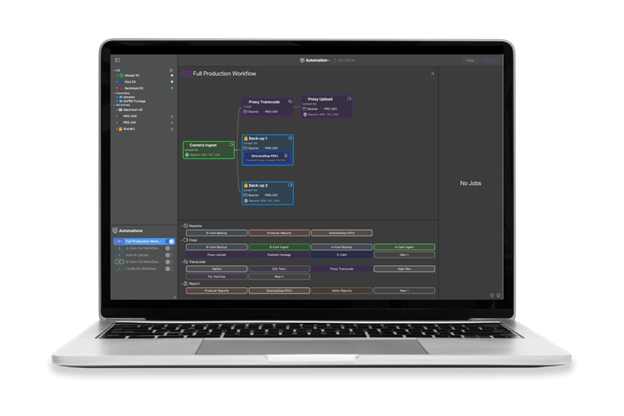
This is the landscape that led to the development of Automation Pipelines in ShotPut Studio. While software solutions for offloading have existed for years, they’ve often required users to string together multiple tools or navigate steep learning curves just to match their desired workflows. Automation Pipelines aims to change that by offering a flexible, user-friendly approach to chaining together tasks like copying, transcoding, and report generation into a single automated process.
But this is not a replacement for skilled media professionals. Rather, it’s a support system built to handle the routine workload so that those professionals can focus on what matters most.
A Flexible Framework for Real-World Workflows
One of the biggest pain points in offloading workflows is the lack of standardization from job to job. Even experienced media managers are often handed incomplete or inconsistent specifications at the start of a shoot, leaving them to make decisions about folder structures, file naming conventions, and delivery formats. And when multiple people are involved in handling footage across multiple days, miscommunication becomes a major risk.
Automation Pipelines helps address this by allowing users to take their Presets, saved configurations for copying, transcoding, and reporting tasks, and use them as the building blocks of a pipeline. And by collaborating on the creation of these during prep meetings, all stakeholders can agree on the process before the first card is ever even offloaded.
Once presets are finalized, the Pipeline Builder provides a drag-and-drop interface for combining them into a complete, start-to-finish workflow. Here users can specify the order of operations, review settings, and make any last-minute adjustments, all in one unified view. When ready, the pipeline can be launched with a single click, executing the entire sequence automatically.

The power of this tool lies in its ease of use. For instance, complex folder structures, multi-destination copies, custom reports, and professional grade transcoding can all be handled without requiring scripting or external tools. The automation is robust enough to support large-scale productions but intuitive enough for smaller teams who might not have a dedicated post supervisor on set.
Bridging the Gap Between Set and Post
Perhaps the most overlooked pain point in this process lies in the handoff between production and post. Even when media is safely offloaded and transcoded, post-production teams often encounter issues when footage doesn’t match expected naming conventions or organizational structures. This results in time-consuming troubleshooting delays that often ripple through the entire pipeline.
Automation Pipelines helps tackle this issue by encouraging early alignment between departments. Because presets are both reusable and transparent, post teams can review the exact settings used on set, ensuring consistency from ingest to edit. ShotPut Studio’s media reports provide further verification that every file was accounted for and processed as intended.
For productions without a dedicated DIT or media manager, the benefits are even more pronounced. A camera operator or assistant can launch a pre-built pipeline, knowing the process will follow the set specs without requiring their full attention.
Reducing Risk, Increasing Focus
At its core, this feature is about freeing up your time and attention. Every minute spent dragging files between folders or triple-checking transcode settings is a minute not spent collaborating or preparing for the next setup. And while the stakes may differ between a short commercial and a feature film, the underlying stress remains the same.
With Automation Pipelines, productions of all sizes gain a tool that brings structure, speed, and reliability to a task that is too often rushed or improvised. And while the technology is evolving, the goal remains timeless, to make sure that what was captured on set arrives in post safely, quickly, and exactly as expected.
About Imagine Products, Inc.
Imagine Products is dedicated to empowering storytellers through intuitive, professional-grade workflow tools, including ShotPut Pro, ShotPut Studio, and myLTO. With over 30 years in the industry and more than 50,000 users worldwide, we continue to develop solutions that simplify production from ingest to archive.